A successful video production starts long before the cameras start rolling. One of the most critical phases of pre-production is the tech scout—the technical reconnaissance of shooting locations. A thorough tech scout ensures that the shoot runs smoothly, mitigating potential issues with lighting, sound, camera angles, and logistics. To optimize the tech scout process, modern filmmakers have access to a variety of tools that help streamline the planning phase and improve accuracy on location.
In this article, we’ll explore six essential tools that can enhance your tech scout and make sure you’re fully prepared for your next video shoot.

1. App – Cadrage: Visualizing Camera Angles and Framing
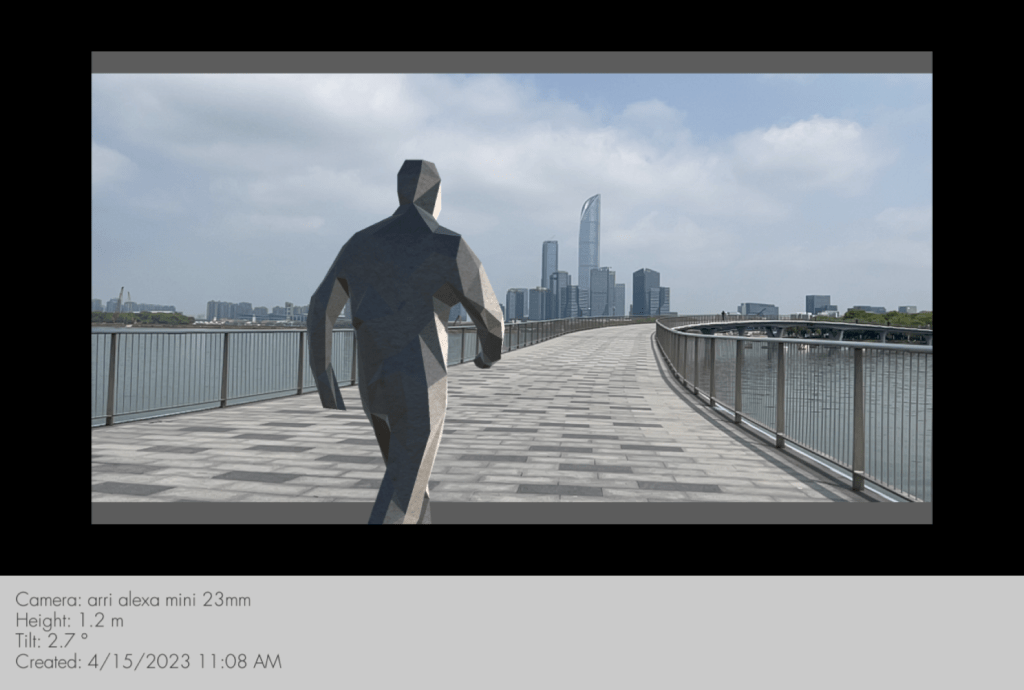
Cadrage is a powerful mobile app designed for directors and cinematographers to quickly visualize camera angles, framing, and shot compositions on location. This app allows you to easily mark positions and experiment with different angles, field-of-view, and camera movements without needing to bring expensive equipment on-site.
Key Features:
- Create shot compositions with virtual camera lenses and focal lengths.
- Experiment with camera movement to see how different shots would work.
- Adjust lighting and shadows to get a sense of how the final shot will look.
- Use it to quickly communicate visual ideas with the rest of your team.
Using Cadrage during your tech scout can save you time and energy, ensuring you’re capturing the right shots in the right locations while adhering to your vision.
2. App – Blocker: Blocking Scenes and Staging Movements
The Blocker app is an excellent tool for directors, ADs, and cinematographers when it comes to blocking scenes and planning actors’ movements. It allows you to map out key actions and staging for each shot, giving everyone on set a clear understanding of where people and objects will be positioned.
Key Features:
- Plan and visualize blocking for actors in 3D space.
- Create movement paths for actors and camera operators.
- Integrate pre-set environments and locations to simulate the scene.
- Share visualized scenes with the crew to align on the flow of the action.
By utilizing Blocker, you can save time on set by having a clear plan in advance, reducing the need for last-minute changes or confusion during filming.
3. App – Sun Surveyor: Plan for Natural Lighting
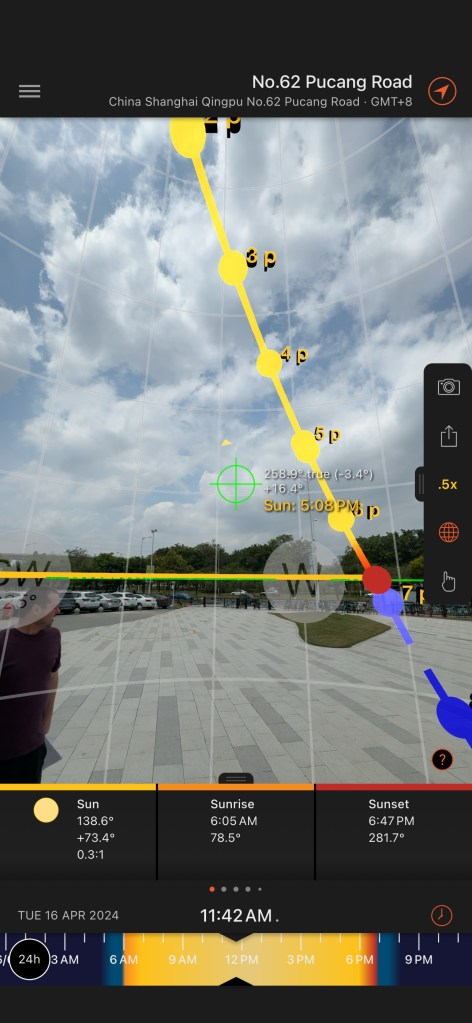
When filming outdoors, natural light is one of the most critical factors to consider. The Sun Surveyor app helps you determine where and when the sun will be at a particular location. It gives you precise data about the sun’s position during the day and how it will change throughout the year, so you can plan the best times for shooting to achieve the perfect lighting conditions.
Key Features:
- Real-time sun positioning and sun paths for any location.
- Augmented reality (AR) feature allows you to visualize the sun’s position in real time.
- Provides solar angle, elevation, and azimuth for accurate lighting planning.
- Offers tools for assessing natural light for both interior and exterior shoots.
Using Sun Surveyor during your tech scout allows you to optimize the natural lighting for your shoot, whether you want dramatic shadows, soft light, or just to avoid harsh midday sun.
4. 360 Camera: Immersive Location Scouting
A 360 camera is an incredibly useful tool for recording a fully immersive view of a location during a tech scout. These cameras capture 360-degree panoramic footage or stills, allowing you to virtually explore locations from every angle later, and share these images with your crew, no matter where they are. This is particularly useful when working with remote teams or for archiving your tech scout.
Key Features:
- Capture full 360-degree images or videos of the entire location.
- Ideal for scouting large or hard-to-reach areas.
- Allows team members to review the location remotely.
- Makes it easier to visualize the flow of shots and movement.
Using a 360 camera provides an easy way to document every detail of your scout and review it later, even after you’ve moved on to other projects. It’s also an invaluable tool for locations that are difficult to revisit.
5. Drone: Aerial Views for Location Scouting
A drone is an invaluable asset for location scouts who need to capture wide, elevated shots or survey areas that may be difficult to access. Drones provide an aerial perspective of the environment, which can help you plan camera angles, monitor the layout of the space, and visualize shots that require a bird’s-eye view.
Key Features:
- Capture high-quality aerial footage for both video and still photography.
- Access remote locations or hard-to-reach spots with ease.
- Survey large locations, such as outdoor landscapes or expansive building sites.
- Get an instant overview of the location to assess its suitability for specific shots.
With a drone, you can take your tech scout to new heights, both literally and figuratively, allowing you to plan for shots that may have been previously impossible to visualize from the ground.
6. Sharing Keynote or PowerPoint Online: Collaborative Location Reports
Communication is key when scouting locations, especially if you’re working with a team scattered across different locations. Sharing reports in real-time allows everyone on the crew to stay on the same page and make collaborative decisions quickly.
Using Keynote or PowerPoint for online collaboration is a great way to create, update, and share your tech scout reports. These platforms enable you to upload photos, notes, maps, and even videos that your team can view simultaneously. Whether you’re at the location or back in the office, you can update your findings, ask for input, or give updates to the rest of the crew in real-time.
Key Features:
- Share location reports instantly with your entire team.
- Include photos, videos, and 3D visualizations to illustrate the location.
- Collaborate in real time, allowing everyone to contribute ideas and feedback.
- Ensure consistency by keeping a digital record of decisions made during the scout.
With Keynote or PowerPoint, you’ll ensure that the entire crew has easy access to the latest information, reducing miscommunication and enabling quicker decision-making.
Pixel Productions China: One of the best video production company in China
Looking for reliable and professional video production services in China? Pixel Productions China is your ultimate partner, offering top-notch video production solutions tailored to your needs. As a leading China video fixer (Video Production Coordinator), we specialize in providing comprehensive services to ensure that your production process runs smoothly from start to finish. Whether you are a local brand or an international production house, our expertise and dedication to quality have made us the go-to choice for the world’s most respected brands.
Experience the difference with Pixel Productions China, where customer satisfaction and exceptional service are our top priorities. Contact us today and let us handle all the logistics, permitting, and on-ground support you need to bring your vision to life in China.
Contact us : info@pixelprocn.com
Feel free to explore more insights below!
Multilingual Video Production Services in China
Innovative Solutions for Remote Video Production in China
What Type of Chinese Visa Should a Camera Crew Apply for?
Camera / Gear Rental in China: A Briefly Overview
Experienced Video Fixer & Production Support in Shanghai China
Experienced Video and Photo Fixer in Suzhou China
Experienced Fixer for Filming in Beijing China
Experienced Video & Photo Fixer in Shenzhen China
Experienced Video and Photo Fixer in Guangzhou China
 CHINA VIDEO FIXER
Leave a Reply